Security
Jump Hippo binds local ports and holds SSH credentials, so its security posture matters. This page explains what it protects, how, and the choices you control.
Binding scope
By default, a tunnel's entry port binds to loopback (127.0.0.1) — reachable
only from your own machine. Nothing on your network can use the tunnel.
Binding to a LAN or wildcard address (e.g. 0.0.0.0:5432) is an explicit,
opt-in choice: enter a full address:port as the entry port. When you do, any
device that can reach that address can use the tunnel — and therefore the remote
destination it forwards to — with no further authentication at the Jump Hippo
layer. Only expose a port when you intend to, and prefer loopback otherwise. The
default bind host for bare ports is set in Settings → Defaults.
Host-key trust
Jump Hippo verifies the host key of every hop against your known_hosts and
its own accepted-keys store, using trust-on-first-use with an explicit prompt. It
never auto-accepts a key, and it refuses a connection whose host key has
changed since you trusted it. This is what stops your credentials from being
handed to an impostor. See Host Keys & Trust for the full
explanation of the "changed key" warning — treat it as a hard stop.
Where secrets live
The only secrets Jump Hippo stores are SSH passwords and key passphrases. They are encrypted at rest and the decrypted value never leaves the main process — the interface only ever knows whether a secret is set.
You choose the at-rest backend in Settings → Security:
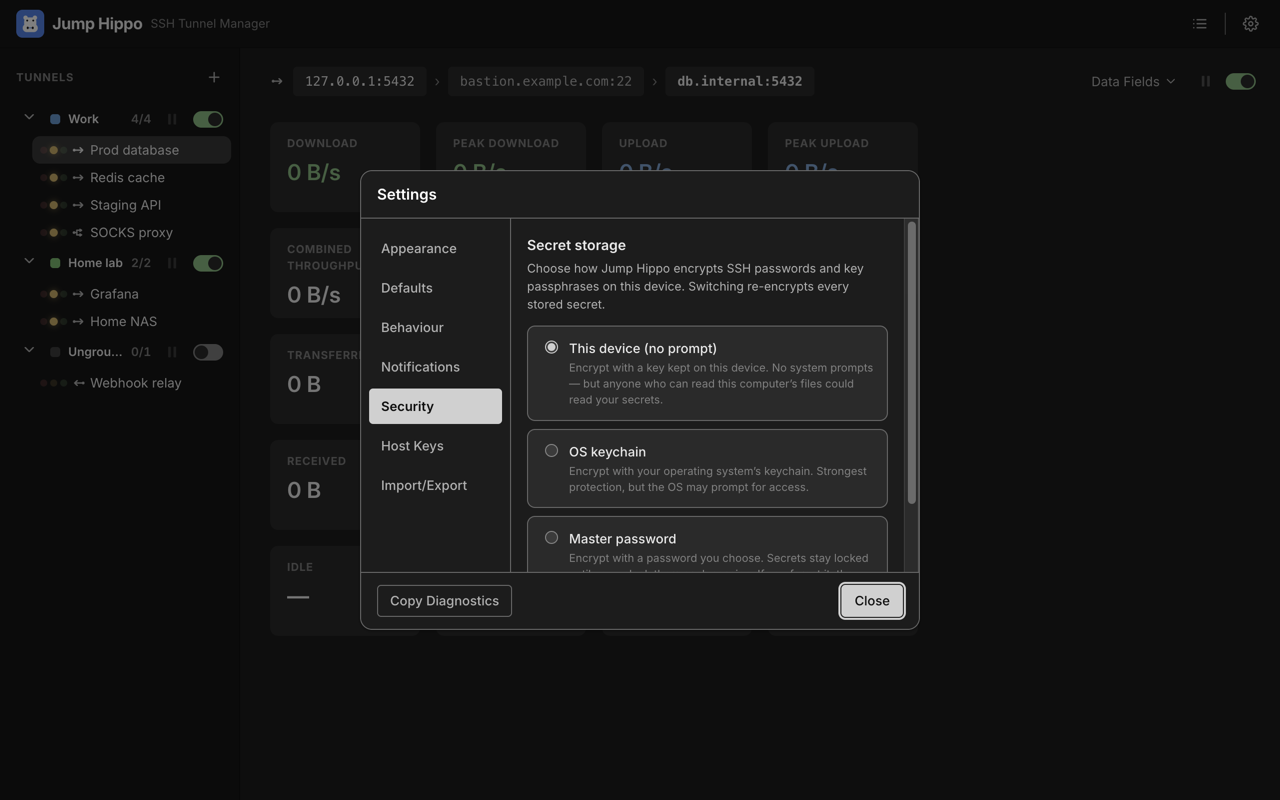
- This device (no prompt) — encrypt with a random key kept in a protected file on this machine. No system prompt. This is the default, so a fresh install raises no keychain dialog. Anyone who can read this computer's files could read the encrypted store's key, so it protects against casual access, not a determined local attacker.
- OS keychain — encrypt with your operating system's keychain (macOS Keychain, Windows DPAPI, Linux Secret Service). The strongest option; the OS may prompt for access. Refused if the keychain isn't available, so a secret is never silently downgraded.
- Master password — encrypt with a password you choose (PBKDF2 → AES-256-GCM). The key exists only in memory, so the app starts locked each run and prompts you to unlock before it can decrypt credentials. If you forget this password, the stored secrets can't be recovered.
Switching backends re-encrypts every stored secret to the new method, all-or-nothing and crash-safe. No mode ever downgrades a secret to plaintext.
An SSH agent credential stores nothing in Jump Hippo — the agent holds the keys. It's the option that keeps the least secret material on disk.
Choosing an auth method
- SSH agent — nothing sensitive stored in Jump Hippo; the agent signs. Best when you already run one.
- Private key + passphrase — Jump Hippo holds the passphrase (encrypted); the key file stays where it is on disk.
- Password — supported, but prefer keys or the agent where the server allows it.
Hostname-resolution checks are protocol-only
The Test resolution feature validates that hosts resolve and are reachable. Any
remote check is done purely over the SSH protocol (a direct-tcpip probe from
the far end) — Jump Hippo never runs a command on a remote host, and it only
ever sends main a draft definition plus hostnames. No secret leaves the main
process to perform a test.
Logs and diagnostics never contain secrets
The rotating application log and the Copy Diagnostics report are redacted:
private keys, password:-style values, and credentials embedded in URLs are
stripped. Secrets are never written to a log or a diagnostics report. The
diagnostics report reads the sealed tunnel list — encrypted values only.
Jump Hippo never phones home
Jump Hippo makes no analytics, telemetry, or tracking calls. It talks to the SSH servers you configure, and — only to check for new releases — to GitHub for update metadata. Your tunnel definitions, credentials, and traffic stay on your machine. It's open source (GitHub), so you can verify this yourself.
Good practice
- Keep entry ports on loopback unless you deliberately need LAN exposure.
- Prefer the SSH agent or key auth over passwords.
- Verify a host-key fingerprint out of band before trusting it, and never clear a changed key without confirming the change is legitimate.
- Use the OS keychain or a master password on a shared or portable machine.
- Keep your OS and Jump Hippo updated (Help → Check for Updates; builds installed from the Mac App Store or Microsoft Store update through the store instead, so the menu item is absent there).